Product
















 Online Service



PRO 5000 72GB vs 48GB: Is Extra VRAM Worth It?_3DSTOR
Many people only look at computing power when buying a graphics card and end up being secretly undermined by the video memory.
In the scenario of large model inference, many people only ask "how many TFlops" and "what is the core frequency", but easily overlook a harsher reality: under high concurrency, the VRAM capacity often becomes the bottleneck earlier than the core frequency.
The Protagonist of This Episode: PRO 5000 72GB vs 48GB
This time, we used the same server, inserted two cards respectively, ran the same model Qwen3.6-35B-A3B-FP8, and used vLLM to squeeze out the performance.
One card costs $2,000 more,with just 24GB more VRAM.Is it worth it?
Test Platform and Environment
| Hardware / Software | Specifications Details |
|---|---|
| Server | MSI G4201 |
| CPU | Intel 6530 × 2 (Total 64 cores / 128 threads) |
| Memory | DDR5 32GB × 4 (128GB total capacity) |
| GPU | PRO 5000 72GB / 48GB |
| System | Ubuntu 22.04 LTS |
| Driver | NVIDIA Driver 595.71.05 |
| Inference Framework | vLLM 0.20.1 + PyTorch 2.11.0 (CUDA 13.0) |
| Test Model | Qwen3.6-35B-A3B-FP8 |
| Test Tool | EvalScope |
Core Data Comparison 1. First, state the conclusion
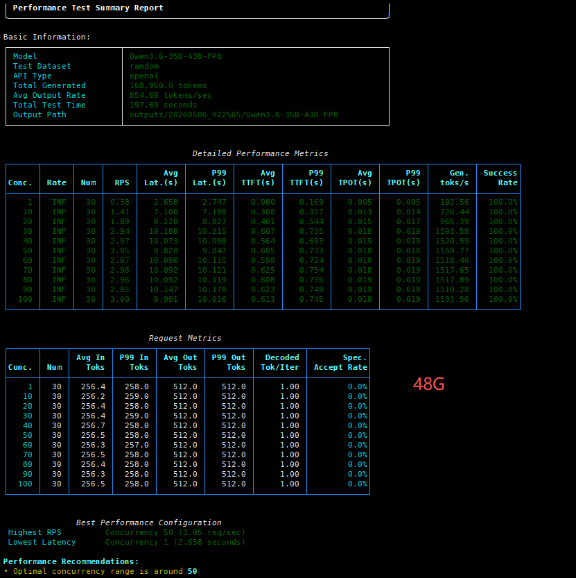
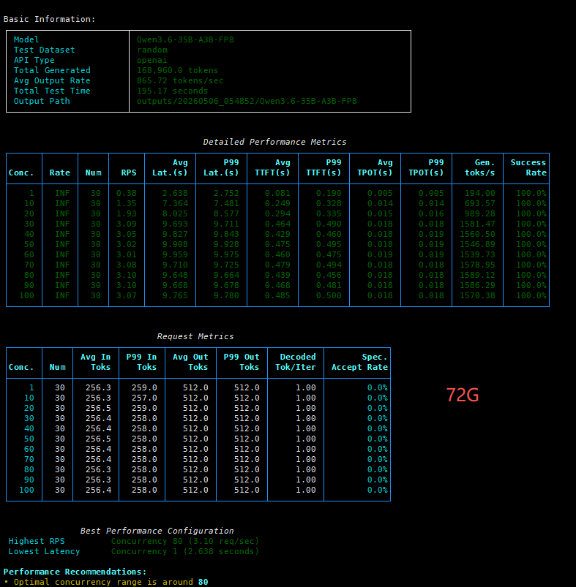
Metric 72GB 48GB Analysis Optimal Concurrency (Optimal Conc.) 80 50 72GB shows a 60% improvement Peak Throughput (Tokens/s) 1589.12 1559.77 72GB is ~1.9% higher Single Request Latency (Latency) 9.638s 9.820s 72GB has a slight advantage Time to First Token (TTFT) 0.439s 0.605s 72GB is ~27% faster
2.Performance Curve Analysis At low concurrency (<40), the two cards perform almost identically, proving that the 72GB version does not compromise on basic computing power. However, the 48GB version starts to struggle at 50 concurrent requests, while the 72GB version can keep going all the way up to 80.
The 48GB version peaks at 50 concurrent requests and then starts to decline, with its video memory being rapidly occupied by the KV Cache, resulting in a performance regression.
The 72GB version continued to climb, reaching a peak of 1589 tokens/s across the board at 80 concurrent requests, and maintained a high level of over 1570 even at 100 concurrent requests, delivering extremely stable performance.
3. Full Test Data Details To more intuitively demonstrate the impact of VRAM capacity on high concurrency, here are the detailed performances of the two GPUs under different concurrency pressures:
| Concurrency | 48GB Throughput (Gen. tokens/s) | 72GB Throughput (Gen. tokens/s) | Data Interpretation |
|---|---|---|---|
| 1 | 192.56 | 194.00 | Minimal difference under extremely low load |
| 10 | 720.44 | 693.57 | 48GB is slightly higher at low concurrency |
| 20 | 966.39 | 989.28 | Both are in the performance ramp-up phase, showing similar performance |
| 30 | 1503.58 | 1581.47 | Both are rapidly approaching their peak throughput |
| 40 | 1520.59 | 1560.50 | 72GB begins to show its advantage |
| 50 | 1559.77 (48GB peak) | 1546.89 | 48GB reaches its saturation point |
| 60 | 1518.46 | 1539.73 | 48GB throughput begins to decline; 72GB shows minor fluctuations |
| 70 | 1517.65 | 1578.95 | The performance gap widens further |
| 80 | 1517.89 | 1589.12 (72GB peak) | 72GB reaches its optimal sweet spot |
| 90 | 1510.28 | 1586.29 | 72GB maintains high throughput |
| 100 | 1533.56 | 1570.38 | 72GB still outperforms the 48GB peak throughput |
Minor fluctuations in the 40-60 concurrency range: 72GB saw a slight drop in throughput in this range, mainly due to temporary scheduling overhead caused by uneven expert routing in the MoE model and fragmentation of VRAM blocks. As the concurrency continued to increase, the fragments were filled, the bandwidth utilization was improved, and the performance rebounded rapidly to a new high. 4. Test Result Screenshot:
What do you get for the $2,000 price difference? 1️⃣ Single Card Replaces Dual Cards: The maximum concurrency for 48GB is only 50. If the business needs to support 80 concurrent users, the 48GB solution requires purchasing two cards and implementing load balancing, with total costs and complexity far higher than those of a single 72GB card. 2️⃣ Future-proof capability: Larger video memory reserves ample space for longer contexts (128K+) and larger models, offering a distinct advantage in the fast iteration of AI.
Who should you choose? For individual developers or low-concurrency scenarios (<50 QPS): The 48GB version offers better cost performance and a similar experience. For enterprise-level applications or high-concurrency SaaS services: We highly recommend the 72GB version. A single card can support higher loads and significantly reduce the total cost of ownership (TCO). In one sentence: In the era of AI high concurrency, computing power determines the upper limit, and video memory determines the lower limit. The extra 24GB is not a waste of money, but a moat for business continuity and scalability. When buying graphics cards, don't just look at the frequency, but also pay more attention to the video memory.
3DSTOR is a global IT component supplier that has been established for many years and has established long-term and stable cooperative relationships with top well-known brands such as Intel, AMD, Nvidia, Western Digital, and MSI. The main products include servers, motherboards, graphics cards, CPUs, hard drives, etc.We have long been focused on serving the global B2B market, providing a variety of AI/ML/HPC solutions, and can provide one-stop procurement services for IT hardware customers with different needs. We promise that our products are 100% brand new and original, and we will also conduct technical testing on the products before shipping.
 Previous page


.png)